

Written By: Valeria Velez
Every finance implementation reaches the same moment: the numbers are loaded, the close is complete, and it is time to put the data to work. Reporting is where users experience the value of the system every day. In this installment, we explore how Black Diamond Advisory’s Guided Reporting and BDA Cube Drill Utility deliver a reporting experience that is ready from day one.
Reporting Should Not Start From Scratch
Every implementation needs the same core views: current month, prior month, prior quarter, prior year, comparatives, variances, percent change. And every organization needs them at different levels of detail: summary, base accounts, and the full account hierarchy. Rebuilding all of that by hand on every project is exactly the kind of wheel-reinventing our add-on components are designed to avoid.
Mix and Match: Row Sets and Column Sets
Guided Reporting is driven by four simple ingredients: a row set, a column set, selectable dimension parameters, and formatting. The magic is that any row set pairs with any column set, so a handful of building blocks slices the balance sheet and income statement dozens of ways.
- Ready on day one: Every project starts with this set already built, so your team has a working starting point immediately. From there you can create, rename, or modify sets to fit your business.
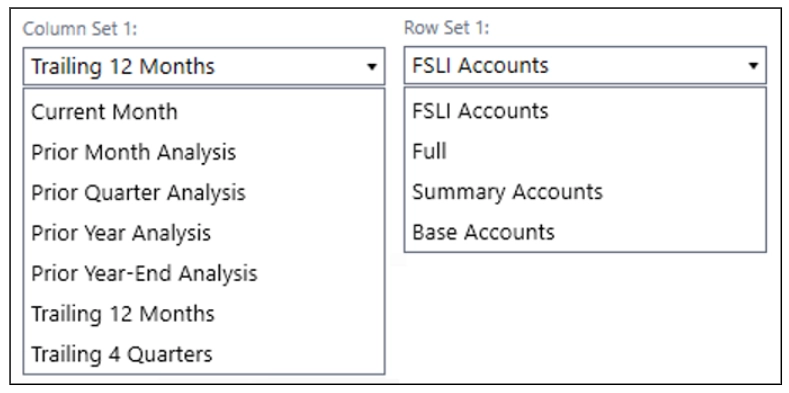
- Pre-built column sets: Layouts like single month, prior month, prior quarter, and prior year, each with current period, comparative, variance, and percent change, plus trailing options like last 12 months and last 4 quarters.
- Pre-built row sets: Switch between a summary account view, base accounts only, and the full hierarchy with all parents and children.
- Selectors that do the work: Change entity, currency, time, and dimensions like profit center or product, and scale in dollars, thousands, or millions, all without rebuilding the report.
One thing worth knowing is that Guided Reporting won’t display a report until all required parameters, column set and row set have been selected. That is by design, it keeps users from staring at a confusing half-rendered report.
Pre-built reports are configured in Guided Reporting to allow for easy user interaction.
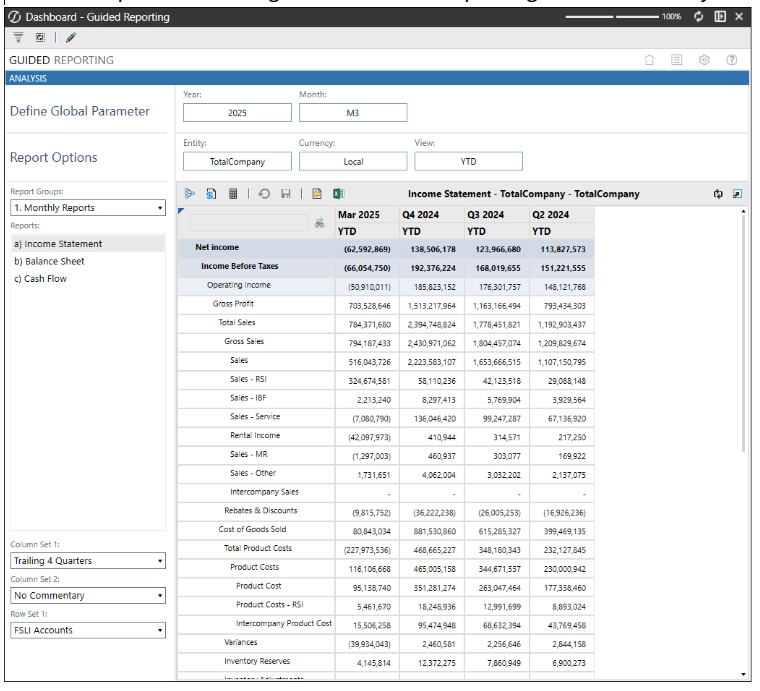
Out of the box, a single income statement report can be presented in 28 different ways just by mixing these sets. Additional rows and column sets can always be added to fit your business’s specific reporting needs.
The Drill Utility: Where It Gets Fun
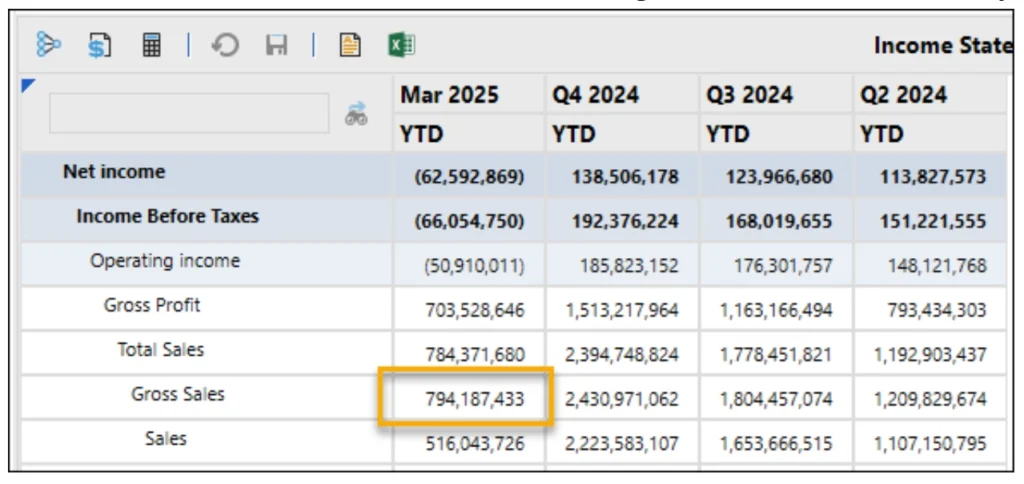
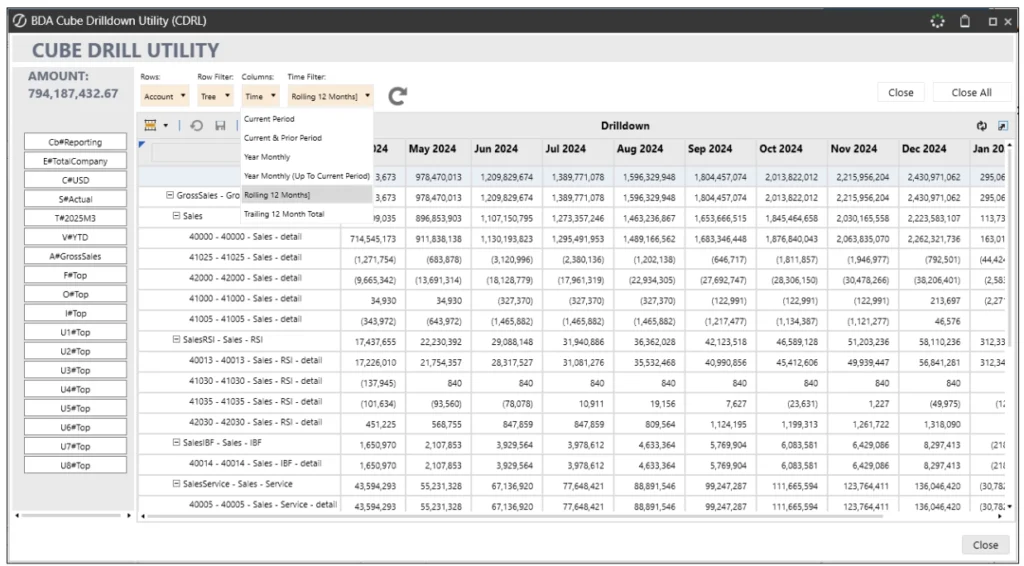
A pre-built report is great until someone asks the question it was not designed to answer. That is where the BDA Cube Drill Utility comes in. Right-click in any cell and a panel opens that lets you pivot on the fly:
- Pivot on any dimension: Drop time into the columns to compare current versus prior, swap dimensions in and out of rows and columns, and refresh to create the new cut.
- Filter to what matters: Narrow to just base accounts, a single product, a profit center, whatever the question demands, right there in the panel.
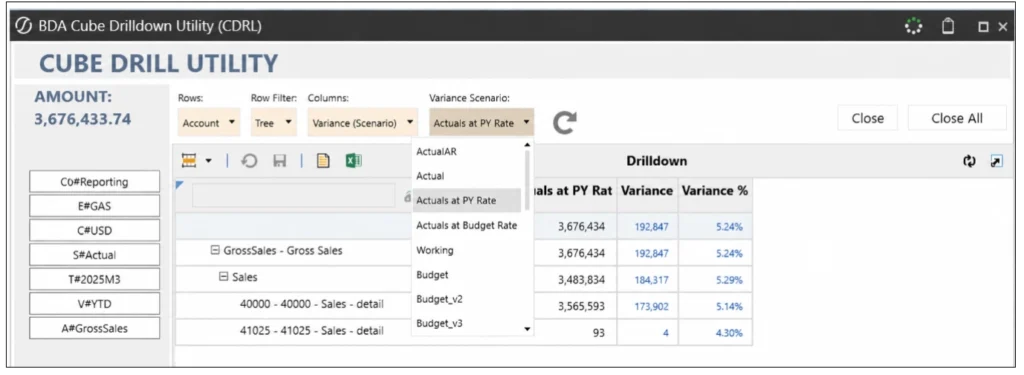
- Apply variance options: Layer in time and scenario variance comparisons without leaving the view.
- Export any view: Send any cut to PDF or a workbook.
It turns “we don’t have a report for that” into “give me thirty seconds.” A quick note on exports: a PDF or workbook export is a point-in-time snapshot, so if your users want something that refreshes, that is what the OneStream Excel add-in is for.
Select a cell to see the details behind it using the BDA Cube Drill Utility.
You can use selectors to view different levels of expansion, tree is selected below.
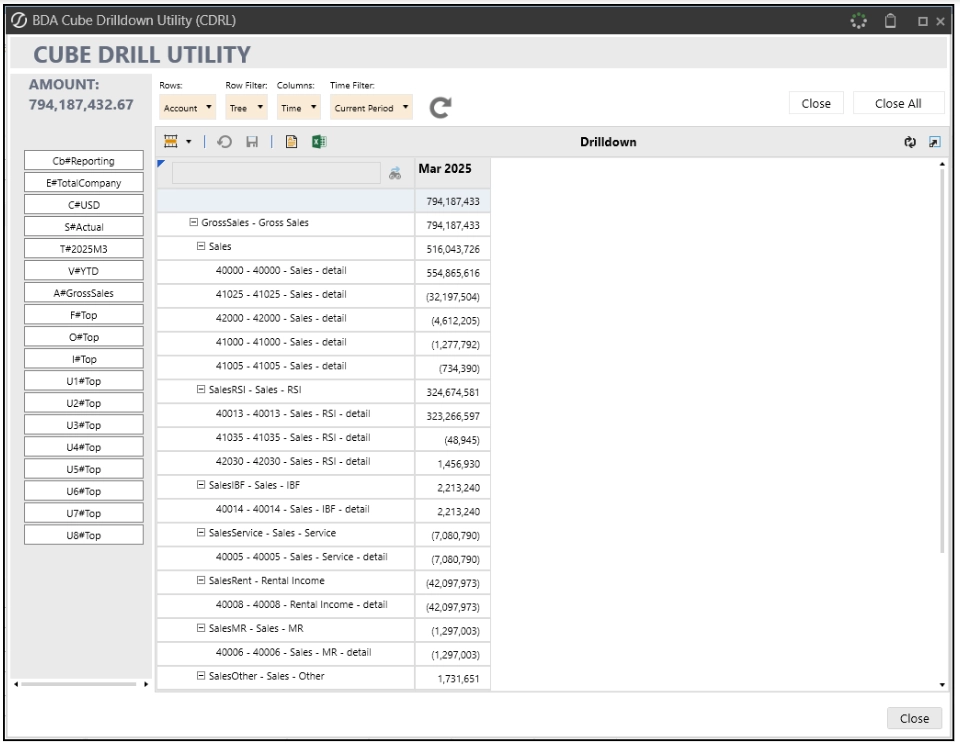
Pre-built selections include time, view, and scenario filters to allow for quick comparatives over time or variance analysis.
Built for Every Close
Guided Reporting is the front door to reporting on every application we deliver. We stand up the standard row and column sets on day one, organize reports into groups by use case (external reporting, management, tax, and so on), and tailor the sets to each client’s chart of accounts and reporting requirements during the build. Then we hand users the BDA Cube Drill Utility, so they are not filing a ticket every time they need a slightly different view. Self-service reporting that does not require a OneStream developer is one of the things clients thank us for most.
Close With Confidence
Black Diamond Advisory’s prebuilt reporting sets, plus the BDA Cube Drill Utility, turn your cube data into reports people can actually run, pivot, and export on their own. When reporting becomes easier to manage, that’s a win for everyone!
Interested in seeing how this works in practice? Reach out to Black Diamond Advisory to schedule a demo and talk through how additional reporting and the BDA Cube Drill Utility could fit into your application.
Next up in the series, and last in the set: Taming Slice Security.